
Ulysses Ludwig’Blog
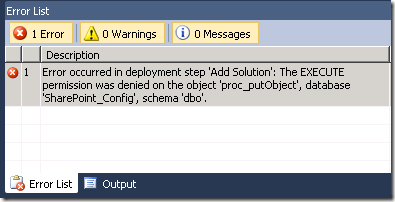
Error occurred in deployment step ‘Add Solution’: The EXECUTE permission was denied on the object ‘proc_putObject’, database ‘SharePoint_Config’, schema ‘dbo’.
When attempting to debut a SharePoint 2010 developed solution you may be presented with the following error. This occurs because the user does not have “SharePoint Shell Access” the the SharePoint_Config database.
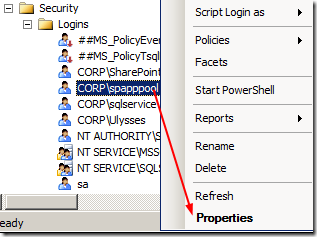
Open SQL Server and right mouse key on the user in question and choose properties
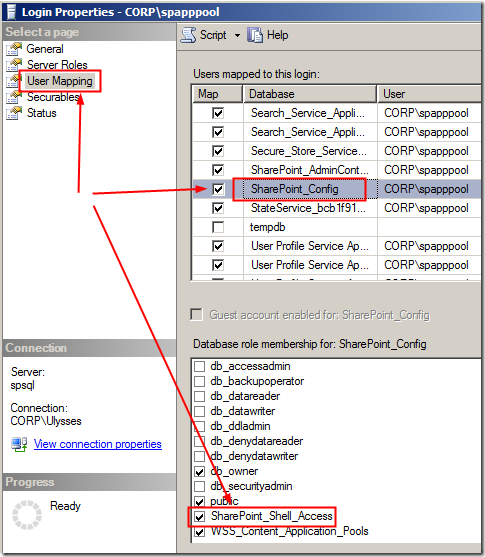
In the Login Properties window click on User Mapping and select the “SharePoint_Config” database. Click the “SharePoint_Shell_Access” role for the user then click ok.
a WordPress rating system
a WordPress rating system
Error occurred in deployment step ‘Add Solution’: The EXECUTE permission was denied on the object ‘proc_putObject’, database ‘SharePoint_Config’, schema ‘dbo’.,


About the author

Ulysses Ludwig is a SharePoint architect with over 16 years in the IT and computer industry. Ulysses' primary focus is SharePoint but he dabbles in the latest web technologies and likes to develop software in his spare time.
Related Posts
3 Comments for Error occurred in deployment step ‘Add Solution’: The EXECUTE permission was denied on the object ‘proc_putObject’, database ‘SharePoint_Config’, schema ‘dbo’.
Great Man………..Thanks a lot….Its working now, I was getting this error.
thanks
Inderjeet

a WordPress rating system
a WordPress rating system
Thank you. This post got me back to being productive in less than a minute.
a WordPress rating system
a WordPress rating system
[...] First, launch the SharePoint 2010 Command Shell (do not just run PowerShell – although you can do this you have to manually import the SharePoint cmdlets. If you receive the cmdlets not found issue then you have to modify your access to the SharePoint_Config database. [...]