
Ulysses Ludwig’Blog
Creating one Content Database Per Site Collection In SharePoint 2010 using Windows PowerShell
One of the most common problems I see in a client built SharePoint environment is multiple site collections comingled in the same content database. While this isn’t the end of the world, it’s a problem because SLAs, security, and even back strategies are often assigned to specific databases based upon the needs of the users that will be using the site collections hosted in each database. If a site collection is not hosted in the database that the admin intended because SharePoint simply picks the first available content database with room the administrator may unwittingly incorrectly back or, even worse, fail to backup a particular site collection because it does not exist in the proper database. This is why I am a proponent of backing up at the Native SQL level but also at the site collection level.
On to the point of this article, how do I use PowerShell to create a site collection and assign the appropriate database
Create the Site Collection
First, launch the SharePoint 2010 Command Shell (do not just run PowerShell – although you can do this you have to manually import the SharePoint cmdlets. If you receive the cmdlets not found issue then you have to modify your access to the SharePoint_Config database.
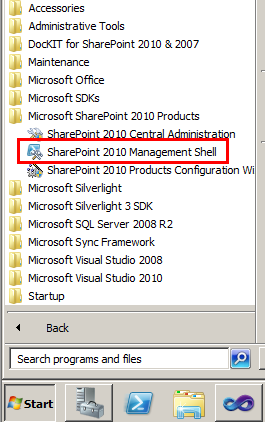
Now that PowerShell is ready, the command is quite simple.
Create a new Explicit managed path that will host the site collection. In the example below we are creating the “IT” managed path.
new-spmanagedpath -RelativeURL /IT -WebApplication http://sharepoint –Explicit
Create a new content database. Many administrators get creative with the naming, I recommend you stick with best practices and prefix the content database WSS_Content_*
new-spcontentdatabase -name WSS_Content_IT -webapplication http://sharepoint
Create the Site Collection, note that you can specify the template as a parameter here if you’d like.
new-spsite -name "IT" -ContentDatabase WSS_Content_IT-url http://sharepoint/IT/ -OwnerAlias "corp\spapppool" –SecondaryOwnerAlias “corp\spsearch”
Enable the publishing prerequisites
sp-enablefeature "PublishingPrerequisites" -url http://sharepoint/IT/
Enable the publishing feature itself
sp-enablefeature "PublishingResources" -url http://sharepoint/IT/
Moving Forward
I typically store the command in a word document so that my client’s can follow the steps sequentially, however, those of you who will maintain this responsibility I recommend you modify these commands to be a ps1 script that takes the site name, database name, site template, and managed path as parameters.
a WordPress rating system
a WordPress rating system


About the author

Ulysses Ludwig is a SharePoint architect with over 16 years in the IT and computer industry. Ulysses' primary focus is SharePoint but he dabbles in the latest web technologies and likes to develop software in his spare time.
8 Comments for Creating one Content Database Per Site Collection In SharePoint 2010 using Windows PowerShell

Hi
Very interesting. I like the way you have done this as it takes the best practice of having seperate site collections for all your deparmentental sites to the next level..
A couple of questions if I may
1) Do you do the same in your dev env .. I am thinking I should as I can mirror my live/uat.
2) Are there any unexpected site affects to consider.
a WordPress rating system
a WordPress rating system
Ulysees,
You have inspired me to script this which i have now done (see below). Incidently you don’t get any of the owner/member groups created (using “sts#1″ ) and my userid gets added to the Style Editors Group … weird eh
# sp_newContentDB
# Script that provisions a new site collection within its own content db
# D Westerdale based on the one provided by Ulysses Ludwig
$SiteCollectionBlankTemplate = "STS#1" # initially OOTB blank template thereafter, our own
$SiteCollectionLanguage = 1033
$WebApplicationURL = "http://YOUR_URL"
$SiteName ="sandbox" # eg.tpr
$SiteRelativeURL = ("/" + $SiteName)
$SiteFullURL = ($WebApplicationURL + $SiteRelativeURL)
$SiteOwner = "YOUR_DOMAIN\SOMEONE" # Dan the Man
$DatabaseInstance = "SERVER\YOUR_SHAREPOINT_INSTANCE"
$ContentDatabasePrefix = "WSS_Content_yourenv"
$ContentDatabaseName = ($ContentDatabasePrefix + "_" + $SiteName)
# Create a managed (relative) path for your departmental site
new-spmanagedpath -RelativeURL $SiteRelativeURL -WebApplication $WebApplicationURL -Explicit
# Create the content database for the top level dept site, accessible via the URL relative path we created earlier.
new-spcontentdatabase -name $ContentDatabaseName -DatabaseServer $DatabaseInstance -webapplication $WebApplicationURL
# Create the new site collection that will reside the newly created site collection
new-spsite -name $SiteName -ContentDatabase $ContentDatabaseName -url $SiteFullURL -Template $SiteCollectionBlankTemplate -OwnerAlias $SiteOwner
#Create the new site collection Publishing features
Enable-SPFeature "PublishingPrerequisites" -url $SiteFullURL
#Enable the Publishing feature itself
Enable-SPFeature "PublishingResources" -url $SiteFullURL
a WordPress rating system
a WordPress rating system
Hi,
i am getting following error when run
The term ‘sp-enablefeature’ is not recognized as the name of a cmdlet, function….
Enable the publishing prerequisites
sp-enablefeature “PublishingPrerequisites” -url http://sharepoint/IT/
pls tell what is and how to fix it.
a WordPress rating system
a WordPress rating system
Enabling the publishing feature is not required, it’s just for example purposes. Along those lines, I believe publishing is an enterprise feature so it may not be enabled in your environment.
Ulysses
a WordPress rating system
a WordPress rating system
The context of the command is incorrect. It should be Enable-SPfeature
a WordPress rating system
a WordPress rating system
Good post. I keep all these commands in OneNote with a link to the TechNet pages that list the parameters, as you never know what you will actually need…. Having a list of commands (such as that listed in this post) makes constructing scripts a lot easier. Thanks.
a WordPress rating system
a WordPress rating system
I was keep on getting “A Site Collection could not be created as the provided managed parth dose not exist.” error message when I try to create a site collection but your script and Instruction helped me to create the site successfully.
Thank You
a WordPress rating system
a WordPress rating system
[...] July 26, 2012 by Aryan Nava 0 Comments Creating one Content Database Per Site Collection In SharePoint 2010 using Windows PowerShell [...]