
Ulysses Ludwig’Blog
SharePointAssist Bulk Edit Tool for Libraries
I am pleased to announce the release of the SharePointAssist Bulk Edit Tool for Libraries. This unique tool allows SharePoint users to complete bulk operations against a group of selected documents to update one or more fields at a time.
Purchase and Trial Information
The SharePointAssist Bulk Edit Tool for Libraries is available for trial and purchase on ExpertAssist.com.
Why Use the SharePointAssist Bulk Edit Tool?
The true power of the software is evident as our vastly increasing Non-IE and Mac user base increases and subsequently exposing the shortfalls of SharePoint’s datasheet view which does not work with Managed Metadata, Macs, and Non-IE browsers. The SharePointAssist Bulk Edit Tool works with most browsers and even works with Managed Metadata fields, users will quickly begin using the software not just for multiple documents at one time but for one or two documents at a time as it reduces the number of clicks necessary to complete a simple Metadata update.
How will users take advantage of the SharePointAssist Bulk Edit Tool
- Datasheet view replacement for batch updates
- Non-IE datasheet view replacement
- Post migration bulk edit operations
- Batch updates
- Document properties editor
To use the SharePointAssist Bulk Edit Tool for Libraries follow the steps below
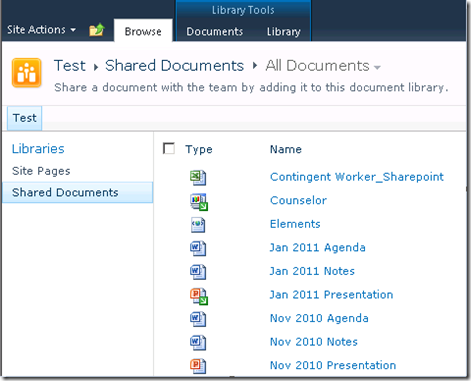
1) Open a document library by clicking on its title
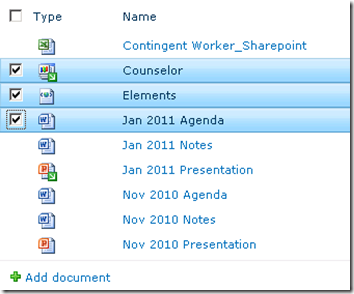
2) Select several documents using the checkboxes to their left.
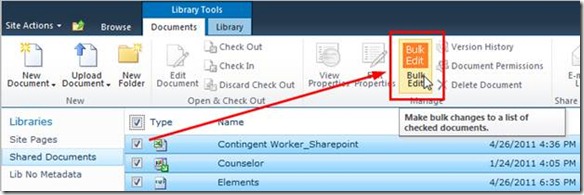
3) Click the Bulk Edit icon on the Ribbon. If it’s not enabled then be sure at least one checkbox is checked
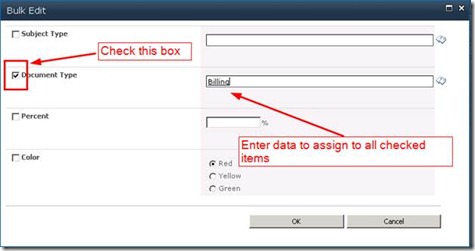
4) Specify the fields and data to update
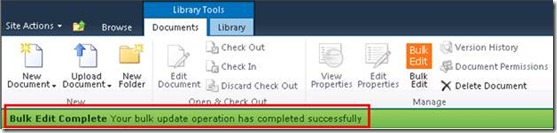
5) Click OK and the Bulk Edit screen will close. A status bar will appear with information about the operation
FAQ
How many documents can I update at a time?
Typically 100 documents can be selected using the individual item checkboxes at a time.
What happens when documents are checked out to the local drafts folder?
The software will warn users with a count of documents checked out to user’s local drafts folders. The software will ignore these files as they are locked until the user uploads the latest version or until an administrator overrides the check out.

What happens when documents are checked out to someone else?
Documents checked out to a user other than the current user will be ignored
What happens when I have a minor version checked out to me?
A new minor version will be created
What happens when I have a major version checked out to me?
A new minor version will be created
What happens when I have both major and minor versions checked out to me?
New minor versions will be added to each
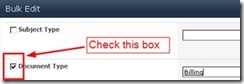
Why aren’t my changes taking effect? I see check in comments stating that the software ran?
Be sure to check the boxes next to each field that needs to be updated.
Where are the default values coming from?
The software uses built in SharePoint controls and uses the default values for each field in the list itself.
Why do I see a red line under the default value for a managed metadata field?
The default value is incorrect for that field or the control has been deleted.


About the author

Ulysses Ludwig is a SharePoint architect with over 16 years in the IT and computer industry. Ulysses' primary focus is SharePoint but he dabbles in the latest web technologies and likes to develop software in his spare time.
Related Posts
9 Comments for SharePointAssist Bulk Edit Tool for Libraries
[...] SHAREPOINTASSIST BULK EDIT TOOL FOR LIBRARIES HAS BEEN RELEASED, PLEASE SEE THE LATEST POST: http://www.sharepointassist.com/2011/04/27/sharepointassist-bulk-edit-tool-for-libraries/ TO PURCHASE OR DOWNLOAD A TRIAL [...]
