
Ulysses Ludwig’Blog
Geneva Error - Exception: System.InvalidCastException: Unable to cast object of type ‘Microsoft.IdentityModel.Configuration.MicrosoftIdentityModelSection’ to type ‘Microsoft.IdentityModel.Configuration.MicrosoftIdentityModelSection’.
I was lazy and decided to uninstall my Beta SharePoint, delete all of the databases, then re-install SharePoint 2010 RTM on my server. Everything ran perfectly through the install until I ran the SharePoint Products Configuration Wizard and received the error shown below.
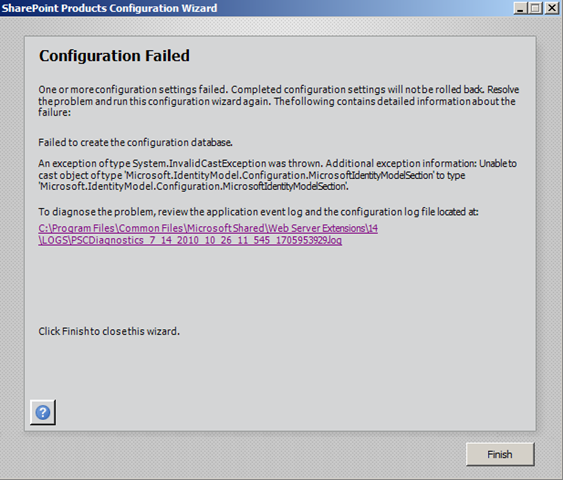
Task configdb has failed with an unknown exception
07/14/2010 10:39:47 8 ERR Exception: System.InvalidCastException: Unable to cast object of type ‘Microsoft.IdentityModel.Configuration.MicrosoftIdentityModelSection’ to type ‘Microsoft.IdentityModel.Configuration.MicrosoftIdentityModelSection’.
at Microsoft.SharePoint.Administration.SPIisWebServiceSettings.ProvisionWebSiteSettings()
at Microsoft.SharePoint.Administration.SPIisWebServiceInstance.Provision()
at Microsoft.SharePoint.Administration.SPFarm.Join()
at Microsoft.SharePoint.PostSetupConfiguration.ConfigurationDatabaseTask.CreateOrConnectConfigDb()
at Microsoft.SharePoint.PostSetupConfiguration.ConfigurationDatabaseTask.Run()
at Microsoft.SharePoint.PostSetupConfiguration.TaskThread.ExecuteTask()
Per the following technet post, there’s an issue with the version of the .NET 3.5 Geneva not properly updating. I believe this is due to the fact that my Windows 2008 R2 is actually 8 months old (from my SharePoint 2010): http://social.technet.microsoft.com/Forums/en-US/sharepoint2010setup/thread/b123b76a-5c16-4611-879e-0cb14b1a638c
Open the web.config file located in C:\Program Files\Common Files\Microsoft Shared\Web Server Extensions\14\WebServices\Root and change the identityModel Version from 1.0.0.0 to 3.5.0.0

Delete your databases and then re-run the SharePoint products configuration wizard and it should now complete successfully.
a WordPress rating system
a WordPress rating system
Geneva Error - Exception: System.InvalidCastException: Unable to cast object of type ‘Microsoft.IdentityModel.Configuration.MicrosoftIdentityModelSection’ to type ‘Microsoft.IdentityModel.Configuration.MicrosoftIdentityModelSection’.,


About the author

Ulysses Ludwig is a SharePoint architect with over 16 years in the IT and computer industry. Ulysses' primary focus is SharePoint but he dabbles in the latest web technologies and likes to develop software in his spare time.