
Ulysses Ludwig’Blog
61738644-F196-11D0-9953-00C04FD919C1 Launch Permissions - Event 10016 on Windows Server 2008 R2 (SharePoint 2007 & SharePoint 2010)
If you are running Windows Server 2003 or a pre Windows Server 2008 R2 build then please refer to this article: http://www.sharepointassist.com/2009/01/27/61738644-f196-11d0-9953-00c04fd919c1-launch-permissions/ . However, if you are running Windows Server 2008 R2 or higher follow the steps below to correct the Event 10016 DCOM error 61738644-F196-11D0-9953-00C04FD919C1 related to the IIS-WAMREG Admin Service.
Always test these changes in your development and staging environment!!!
The DCOM Errors will appear in the System event log as Event 10016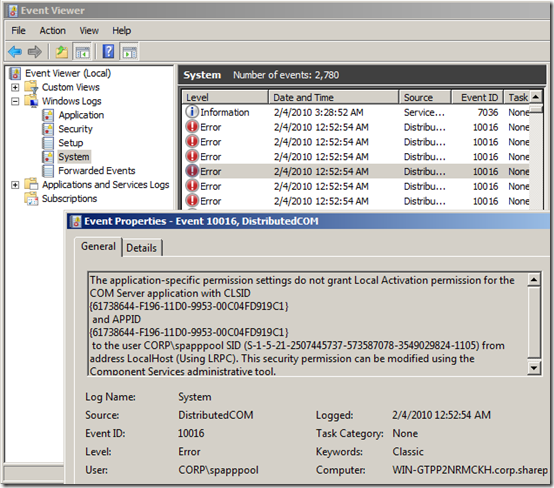
Normally, to correct this problem you would simply open component services and fix the problem http://www.sharepointassist.com/2009/01/27/61738644-f196-11d0-9953-00c04fd919c1-launch-permissions/
You don’t have rights with R2 because only the trusted installer has rights to change the security on this component.
Launch regedit
Accept the UAC warning
Type F3 and search for the following string: 61738644-F196-11D0-9953-00C04FD919C1 related to the IIS-WAMREG Admin Service.
Right mouse key on the key in the left hand pane then select permissions (do NOT change anything yet) and press the Advanced button
On the advanced security settings screen
- Select the Owner Tab
- Select a user in the “Change owner to:” box
- Check the “Replace owner on subcontainers and objects”
- Press apply
Now on the properties tab you may grant “Full Control” to the Administrators or another appropriate group
Now launch component services and locate the IIS WAMREG Admin Service
On the properties screen for the service
- Choose the Security tab
- Press Edit on the Security tab
- Press Add on the Launch and Activation Permissions window
- Choose the appropriate user which is most likely your Application Pool account
Grant the user Local Launch permissions and press OK
That’s it, you should no longer see the errors in your System Event log
a WordPress rating system
a WordPress rating system


About the author

Ulysses Ludwig is a SharePoint architect with over 16 years in the IT and computer industry. Ulysses' primary focus is SharePoint but he dabbles in the latest web technologies and likes to develop software in his spare time.
7 Comments for 61738644-F196-11D0-9953-00C04FD919C1 Launch Permissions - Event 10016 on Windows Server 2008 R2 (SharePoint 2007 & SharePoint 2010)
[...] Enhanced Instructions for Windows Server 2008 R2 Users [...]
[...] 61738644-F196-11D0-9953-00C04FD919C1 Launch Permissions – Event 10016 on Windows Server 2008 R…. [...]

I went through the process, but am still getting errors. It is curious that the error has to do with Local Activation, but yet the article says to grant Local Launch permission. I’m going to grant Local Activation permission as well to see if that helps.
a WordPress rating system
a WordPress rating system
Good point, I’ve been wrong before and I’ll be wrong again, but I’m hoping this at least lead you in the right direction? Let me know the result and I’ll update the post.
a WordPress rating system
a WordPress rating system
This is one of error I can actually cross off. Good Show.
a WordPress rating system
a WordPress rating system
Great fix, thank you, just needed to reboot after changing the permissions in rededit to complete.
a WordPress rating system
a WordPress rating system

Thanks for posting this - I had followed similar guides for pre-2008 R2 and been stuck due to the permissions issue. I’ll add the registry trick to my little black book.
Thanks again!
a WordPress rating system
a WordPress rating system