Problem
On a regular basis I have clients tell me that they don’t have rights to edit a list item. On further investigation it is quite clear that they do have the necessary rights they just don’t see the edit menu on the view that you, or another administrator has made available to them.
Explanation
This usually happens in SharePoint implementations where sites are created off of a template. This template has views that present data with the edit menu shown below.
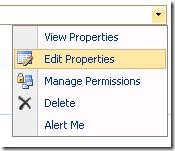
When users don’t see this menu they think they don’t have rights. The user is confused simply because you are displaying this field with the “Name linked to document” instead of “Name (linked to document with edit menu)”.
Solution
All you need to do in this case is edit the view that presents this data to the user. In the example below I show how to edit the current view but I recommend you update an underlying view and then apply that view to the web-part in question.
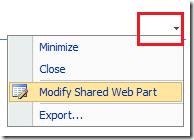
Step 1 – Modify the Shared Web Part
Step 2 – Select “Edit the current view”
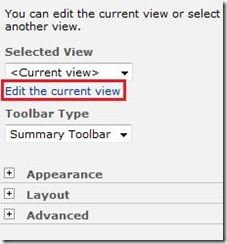
Step 3 – Check the column “Name (linked to document with edit menu)”
a WordPress rating system
a WordPress rating system
Popularity: 11% [?]
Let say I would like to change the linked to document with edit menu of Name to Title, how do it do it? Thanks!!!
a WordPress rating system
a WordPress rating system
Hi,
How to add the new edit menu?
Thanks in advance.
a WordPress rating system
a WordPress rating system